
“Coding” Like It’s 1998 with HTML
This is the first complete blog that I have written entirely in HTML. At the moment, I am feeling undeservedly proud of myself. I am basically a coder now, tell everyone you know.
The purpose of this blog post is two-fold:
- To practice the Hyper Text Markup Language (HTML) skills I started learning on codeacademy for free this morning!
- To discuss the relevance of learning basic web development tools for a marketing professional
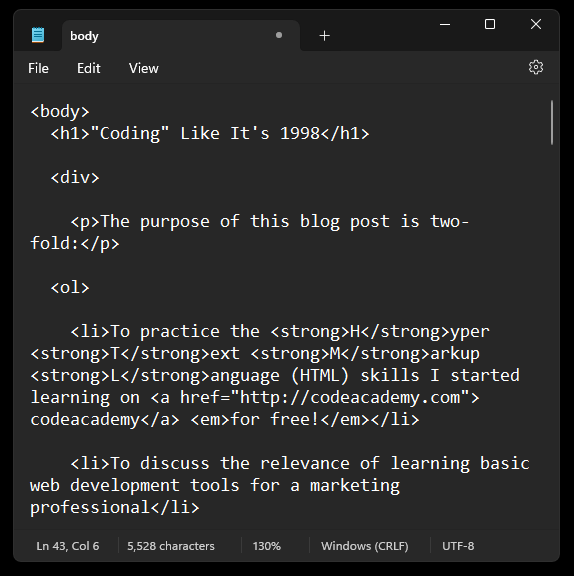
So far I’ve managed to write a brief introduction with two bulleted points. This has taken up 11 lines in the notepad app I’m using to prepare my HTML for testing. This process would certainly be a lot faster if I just used the built-in text editing tools that are available in WordPress. However, I might want to go back later and make my post look fancy, or add links, or images. Sure, those processes are also basic functions of the user-friendly blocks functionality that has made WordPress one of the most popular site builders on the internet. But what if I wanted to do something more complex, like creating a contact form that could be used to collect my site visitors’ information?
That’s exactly the problem that led me to participating in this exercise in the first place.
Last week I was tasked with updating one of the web pages for my company’s website. We are in the process of rolling out a new service offering and need a visually appealing landing page that provides sufficient information to our prospects that will lead to a subscription sale. No problem! While I don’t consider myself to be a tech guru, I’m certainly tech savvy enough to build a webpage with the plugins we have integrated into our website. Right?
Sort of. But here’s the catch. Like so many things online nowadays, software developers operate on the drug-dealer model. You can get a little taste for free, but the good stuff is going to cost you. And not just once, but forever. That’s right, another subscription. To be fair, if you were to conduct a thorough cost-benefit analysis of learning everything necessary for building a website from scratch versus paying the subscription fee – you’re going to have to invest a great deal of time. You might even come to the conclusion that the math favors paying the subscription fee. That or you’ll need to have someone with the requisite skills on staff, or contract a specialist to accomplish the task. No matter which choice you make, it’s going to cost you. Technically, you’re losing money just reading this right now.
Just accept that your money is forsaken and start spreading it around.
Unless it’s not your money. If you have happen to have the combination of a healthy work ethic, and an employer who treats you well, you should feel compelled to keep the company’s bottom line in mind when completing your assigned tasks. Especially if you work for a small business where the responsibility for success is less abstract than in a mega-corporation. That’s not to suggest that you should be flippant with the finances just because you’re a cog in a monolithic corporate entity, but the rationalization for willy-nilly expense incursions probably comes easier when you’re lost deep in the machine.




Everyone Benefits From a Diverse Skillset
Whether you’re a cog or the crank, it’s always beneficial to diversify your skillset. I’ve heard it suggested that the accepted wisdom of specializing in a singular task is no longer vogue. Instead, the Jack of All Trades is about to have his day. With the ever increasing pressures of automation threatening to replace specialized tasks, the survivors in the labor market just may be the people who dedicate themselves to lifelong learning.
This portion of the blog is written using Blocks.
I was running out of time to get this blog posted on schedule but there were a few elements I wanted to include for posterity that would take too much time to write out in HTML. I spent the day preparing for a parade tomorrow and I still have a lot to do before I can go to bed, turn around, wake up early and festoon the St. Patrick’s day revelers with shiny beads, can coolers and informational brochures. I still need to play with my cats, practice the piano, exercise, practice more HTML, do laundry, shower and hopefully get to bed at a decent hour.
I’m almost certain I was excessive with the alt text. I shall endeavor to get the consensus on alt text length and perhaps try out a screen reader to see how effective my efforts were in describing the A.I. generated images included in the custom HTML portion of this blog. If you happen to be reading this page with a screen reader, perhaps you can share your opinion.
The following is a list of topics that were covered in the introductory lesson on HTML that I practiced.
- HTML stands for HyperText Markup Language and is used to create the structure and content of a webpage.
- Most HTML elements contain opening and closing tags with raw text or other HTML tags between them.
- HTML elements can be nested inside other elements. The enclosed element is the child of the enclosing parent element.
- Any visible content should be placed within the opening and closing
<body>tags. - Headings and sub-headings,
<h1>to<h6>tags, are used to provide titles for sections of content. <p>,<span>and<div>tags specify text or blocks.- The
<em>and<strong>tags are used to emphasize text. - Line breaks are created with the
<br>tag. - Ordered lists (
<ol>) are numbered and unordered lists (<ul>) are bulleted. - Images (
<img>) and videos (<video>) can be added by linking to an existing source.
Source: Introduction to HTML | Codecademy
I didn’t use <span> or <video> or id=, which was covered but not mentioned in the wrap-up listed above. I also did not closely follow the spacing conventions for ideal HTML. I think I would greatly benefit from using an HTML editor with a syntax highlighter as opposed to suffering with the hard to read Microsoft Notepad.
I’ll likely research the recommendations made by Jenni Mckinnon at 10 Best HTML Editors (WYSIWYG) Free & Paid Options | websitesetup.org since it was the top ranked search result. More to follow.
 Monopreme
Leave a comment